Category Archives: security

That Tracking Popup on Your Phone? Here’s What’s Actually Going On Behind It

Iphone app-tracking

Every iPhone user has seen that little prompt asking whether an app can “track your activity across other companies’ apps and websites.” Most people instinctively tap Don’t Allow and carry on with their day. But very few stop to ask what they’re actually saying no to, and more importantly, what was happening before this prompt even existed.

Here is the break down.

The Quiet Identifier You Never Knew About

Before Apple introduced its App Tracking Transparency (ATT) framework in iOS 14.5, every iPhone carried something called an IDFA — Identifier for Advertisers. Think of it like a license plate bolted to your phone. Every app you installed could read it. No questions asked. No prompts. No consent.

So when you browsed gulab jamun on a shopping app at 10pm and then saw an ad for the exact same pair on Instagram the next morning, that wasn’t a coincidence and it wasn’t your phone “listening” to you. What actually happened is far more mundane and far more systematic. Both apps were reporting your behaviour to the same advertising exchange, tagged with that one persistent ID. Your browsing history, your purchase intent, your location patterns, all stitched together into a neat behavioral profile. Not by one company, but by an entire ecosystem of ad networks, data brokers, and demand-side platforms that most people have never heard of.

The IDFA was the thread that connected all of it.

What Apple Actually Changed

With ATT, Apple did something deceptively simple, it made apps ask before reading that identifier. That’s it. The tracking infrastructure didn’t disappear. The ad exchanges are still there. The data broker pipelines are still humming. Apple just added a gate at the front door.

And it turned out that gate was devastatingly effective. Somewhere between 75–85% of users opted out when given the choice. Billions of dollars in ad revenue evaporated almost overnight. Meta alone attributed a $10 billion annual revenue impact to this single change. One prompt. One toggle. That’s all it took to collapse a surveillance advertising model that had been running unchecked for over a decade.

SOURCE: https://www.forbes.com/sites/danielnewman/2022/02/10/apple-meta-and-the-ten-billion-dollar-impact-of-privacy-changes/

Look at Which Apps Are Asking

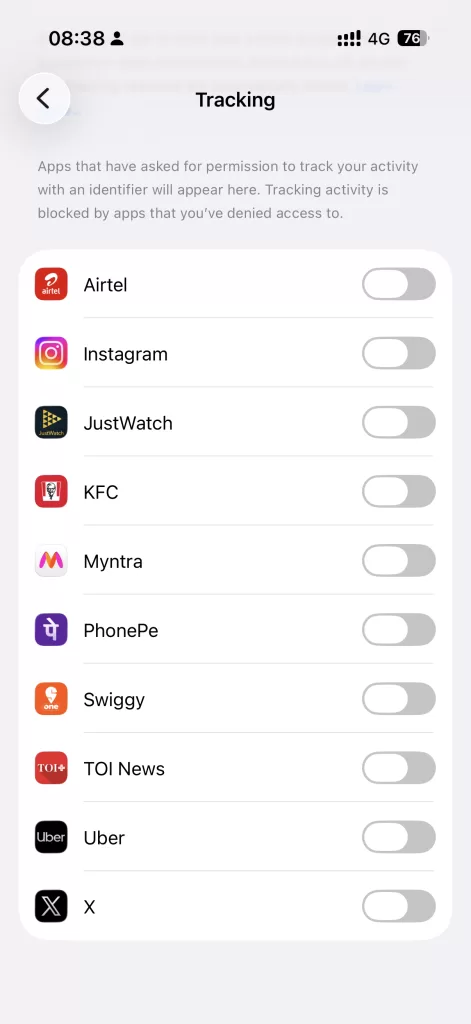
Here’s what I find interesting, pull up the Tracking settings on your iPhone and look at the list of apps that have requested this permission. Food delivery apps. Shopping platforms. Payment wallets. News aggregators. Social media. Ride-hailing services.

Not one of these needs cross-app tracking to function. Your food delivery app doesn’t need to know what you were browsing on a fashion app to deliver your biryani. Your payments app doesn’t need to correlate your reading habits with your transaction history.

They want this data because your cross-app behavioral profile is worth more to advertisers than what you actually pay for the service. In many cases, especially with free apps, you are the product being sold, and the IDFA was the barcode.

What “Don’t Allow” Actually Does (And Doesn’t Do)

Here’s the part most people get wrong. Tapping Don’t Allow does not mean the app stops collecting data about you. It means the app can’t correlate what you do inside it with what you do outside it. Within its own walls, the app still sees everything: your searches, your clicks, your time spent on each screen, your purchase history, your location if you’ve granted that separately.

What ATT blocks is the cross-pollination, the stitching together of your identity across unrelated apps and websites using that shared advertising ID. That’s an important distinction, because it means your privacy posture after tapping “Don’t Allow” is better, but it’s not airtight.

The Workarounds Are Already Here

The ad industry didn’t just accept this and move on. A parallel infrastructure of workarounds has been growing since the day ATT launched.

Fingerprinting uses device-level signals like screen resolution, installed fonts, battery level, network configuration to build a probabilistic identity without needing the IDFA. Apple’s policies technically prohibit it, but enforcement is inconsistent and the practice is widespread.

Server-side tracking moves the data exchange off your device entirely. Instead of the app sending your IDFA to an ad network, the app’s backend server talks directly to the ad platform’s backend. The tracking still happens and it’s just invisible to Apple’s on-device enforcement mechanisms.

Cohort-based models group users into behavioral clusters rather than targeting individuals. Google’s Privacy Sandbox and similar initiatives pitch this as “privacy-preserving,” but critics point out that sufficiently small cohorts can still approximate individual targeting.

The tracking prompt can’t reach any of this. The surveillance didn’t end. It just moved one layer deeper.

So What Should You Actually Do?

Keep tracking off for everything. That’s the baseline. But don’t mistake one toggle for comprehensive privacy. Here’s what a more realistic posture looks like:

Review app permissions regularly. Location, microphone, contacts, photos. Note that each of these is a separate data surface that apps routinely over-request. Audit them under Settings → Privacy & Security.

Use a DNS-level content blocker. Tools like Pi-Hole, NextDNS or AdGuard can block tracking domains at the network layer, catching what ATT misses. This is especially useful against server-side tracking and fingerprinting scripts.

Be skeptical of “free” apps. If a service is free and feature-rich, ask yourself what the business model actually is. If it’s not obvious, the answer is almost always advertising — and advertising at scale requires surveillance.

Limit the number of apps on your phone. Every installed app is a potential data collection endpoint. If you used it once three months ago and haven’t opened it since, it doesn’t need to be on your device.

The Bigger Picture

That one little prompt on your iPhone represents something much larger. It’s a rare moment where a platform company made surveillance visible and gave users a genuine opt-out. The fact that the overwhelming majority chose to opt out tells you everything about how people actually feel about being tracked when they’re given an honest choice.

But it also revealed how fragile privacy gains are when the entire economic model of mobile apps is built on behavioral data extraction. One wall, no matter how well-built, doesn’t make a fortress. It’s a start. Treat it that way.

#privacy #ads #devicefingerprint #ATT #do-not-track #AppTrackingTransparency

DC 5 levels below ground

Five Floors Underground: The Wake-Up Call for Cloud Resilience


A few years ago, I was auditing one of the largest financial institutions in the Middle East for their cyber resiliency. During the walkthrough, I discovered their primary data center was five floors underground. Five!

Naturally curious, I asked their CISO if there was any specific reason for going this deep? Although this was a legacy he had inherited, his answer was simple:

“Regional constraints.”

I didn’t fully get it then. I do now.

Last week, Iranian drone strikes took out AWS data centers in UAE and Bahrain. Banking apps went dark. Payment systems froze. Enterprise software across the region just… stopped.

The cloud, it turns out, has a very physical address. And that address can be hit.

That CISO and his predecessors weren’t being paranoid. They were being realistic. They understood something that a lot of us in infosec and cloud governance are only now waking up to, that in certain parts of the world, your DR strategy isn’t just about ransomware and config drift. It’s about missiles and drones also.

This changes the conversation around cloud concentration risk entirely. When we evaluate third-party cloud providers, how many of us are factoring in geopolitical threat vectors against the physical infrastructure? How many risk registers account for kinetic attacks on a hyperscaler’s availability zone? Also, the lack of transparency by the cloud computing companies on their Multi-Availability zones distance isn’t helping the cause.

The Gulf has cheap energy, massive funding, and ambitious AI plans. But the same geography that makes it attractive also makes it a target. The $2 trillion in tech investment commitments from last year look a lot different today.

A while ago this news about Iran targeting the financial institutions in Israel and surrounding regions, the DC being in a secure physical location makes even more sense:  https://www.reuters.com/world/middle-east/iran-will-target-us-israeli-economic-banking-interests-region-state-media-2026-03-11/

For those of us in GRC and infosec this is a wake-up call. Cyber Resilience isn’t just a checkbox on a compliance framework. Sometimes it means putting your data center five floors underground and not explaining why to auditors who ask too many questions.

That CISO’s predecessors knew the assignment.

#cyberresilience #DC #DR #BCP #Geopolitics #physicalsecurity

https://maps.app.goo.gl/URnYm2iRYVgVEVsb6?g_st=ic

Audit Survival Guide for Startups and Engineers

A few years ago, while I was leading security initiatives at a fast-growing fintech, the regulator decided to conduct an inspection, what most people would formally call an audit. All hell broke loose, most of the team came from an e-commerce background, where regulatory audits were rare, if not completely unheard of.

Questions started flying almost immediately. What exactly is an audit? What will they ask? Do we need to generate evidence? How strict are auditors? What’s the flow of the inspection?

During one of our internal audit discussions, someone from the engineering team casually referred to the auditor as “the dude.” The auditor, quite rightly, responded with: “Please use parliamentary language” 😀

That moment stuck with me and became the trigger for documenting a set of very practical do’s and don’ts. We eventually navigated the inspection successfully. I spent a good amount of time guiding engineers, articulating the process, and helping everyone stay calm, prepared, and professional.

I was reminded of that experience recently when a client found themselves in a very similar situation: first audit, regulated environment, and a lot of nervous energy. That’s what led me to put together this survival guide.

Any Senior engineer working in a fintech company would face an Audit at some point in their career. Audits don’t just involve leadership; engineers, admins, and team leads are often pulled in to explain systems, controls, and evidence. If you’re facing your first audit, I hope this helps you approach it with a bit more confidence (and fewer surprises).


1. Professional Conduct (Non-Negotiable)

  • Be formal and respectful. Address auditors as Sir/Madam.
  • Avoid casual language like bro, dude, or inside jokes—even with colleagues.
  • Remember: everything said in an audit meeting is effectively “on record”.

2. How to Answer Questions

  • Answer only what is asked, no extra context unless requested.
  • Keep responses clear, factual, and concise.
  • If unsure, say: “I’ll check and get back with a confirmed answer.”
  • Never guess, assume, or improvise.

3. Use the Audit Anchor

  • There is usually a designated audit point-of-contact from the company side.
  • Route clarifications, follow-ups, or concerns through this person via a separate channel.
  • Do not attempt to “negotiate” or over-explain directly with auditors.

4. Stay Calm (Even When It’s Painful)

  • Some auditors deeply understand systems; some don’t.
  • Repetitive or irrelevant questions are part of the job and don’t take them personally.
  • Frustration or irritation only creates more scrutiny.

5. Evidence: Quality > Quantity

  • Share only the evidence requested and nothing more.
  • Verify accuracy before submitting (wrong evidence causes more questions).
  • Prefer PDF format for all evidence.
  • Name files clearly and consistently.

6. Documentation Is Your Shield

  • Document your work as you build—not just for audits.
  • Good documentation reduces explanations, meetings, and follow-ups.
  • If it’s not documented, assume you’ll have to explain it later.

7. Screen Sharing: Handle with Care

  • Never share your entire screen on Zoom, Google Meet, etc.
  • Always share only the specific application window needed.
  • Double-check for sensitive tabs, terminals, or notifications before sharing.

8. Sensitive Data: Stop and Escalate

For any of the following, do not share directly:

  • Database screenshots
  • PII or customer data
  • Passwords, secrets, tokens

Always get approval from: Your Manager, InfoSec and/or Legal teams.


Final Rule of Thumb

Be precise. Be calm. Be professional.

Audits are about evidence and clarity and not speed or bravado.

You might also be interested in reading about Audit Fatigue

TPRM Audit Fatigue: When Trust, Time, and Teams Collide


audit fatigue

Lately, I’ve been observing a growing trend where Financial Institutions (Banks and NBFCs) are increasingly mandating 3-day onsite audits as part of their Third-Party Risk Management (TPRM) programs. It often feels like an implicit signal that they don’t fully trust the fintechs or startups they work with, even those that proudly hold ISO 27001 or SOC-2 certifications. These certifications were meant to demonstrate a baseline of security maturity and due diligence, yet they’re being treated more like a footnote than a foundation.

Now, if you’re a fintech or startup working with even a moderate number of financial partners, say 8 to 10, your security and GRC teams could be spending upwards of 30 working days a year managing these TPRM audits. That’s nearly a month of valuable bandwidth lost to redundant assessments and fragmented processes.

To make matters even more tangled, there’s no standard playbook across auditors. Some send sprawling spreadsheets. Others insist on a live walkthrough with no prep and rapid-fire questions. Yet another expects you to navigate a third-party portal with its own quirks and terminology. Every new audit feels like starting from scratch.

Walkthrough-style audits, in particular, tend to be the most disruptive. They often require specific team members to join calls, explain configurations, demo access flows, or justify implementation choices. And since the questions tend to repeat across audits, these sessions end up being déjà vu for many teams, especially engineering. Their time is typically reserved for product building and problem-solving. Getting them to repeatedly field audit questions naturally creates friction between Engineering and Security, and sometimes even with the partner institutions.

On the flip side, the pressure within startups isn’t helping either. Many founders are pushing their teams: security, engineering, DevOps, legal, consultants—to rush through ISO or SOC-2 readiness on extremely tight deadlines. I’ve heard the same frustration echoed by several folks: long nights, tight audits, no breathing room. It’s become a checkbox race, not a maturity journey.

There’s also a growing school of thought within the industry that ISO/SOC-2 reports, especially the ones churned out by compliance automation platforms are becoming more of a sales enablement tool than a reliable indicator of security posture. That perception is driving financial institutions to dig even deeper during TPRM audits, essentially second-guessing the very frameworks designed to reduce the need for redundant assessments.

It’s tempting to wish for regulatory clarity here—perhaps a unified guidance from the regulator on how TPRM audits should be approached across the ecosystem. But that might be asking too much, given the operational nature of these audits and the regulator’s usual hands-off stance on implementation details.

To me, this is a multi-layered challenge. ISO and SOC-2 were designed to communicate security assurance to stakeholders for both internal teams and external partners. But if the output is no longer trusted, the entire premise starts to wobble.

As a small experiment, I once created a detailed Security Handbook for a client I consult for as a vCISO. It outlined their security practices end-to-end and drastically improved our turnaround time for security questionnaire responses. But unfortunately, the auditors weren’t too pleased—they preferred their own templates, their own questions, their own format. It didn’t matter that the answers were clear and well-structured. Standardization was nowhere in sight.

And let’s not ignore the irony where auditors are still asking for screenshots in an age where APIs could provide real-time evidence. It just feels out of sync with the pace and capabilities of modern tech. Honestly, this entire space is long overdue for disruption.

So the question is “how do we solve this?” What’s a practical, scalable way to balance assurance demands with the productivity of already stretched teams? How do we rebuild trust in certifications without burning out people in the process?

Would genuinely love to hear your thoughts.